Sound
o/DAILIES knows a project's production sound: every take the sound recorder made, and which camera clips each take was synced to. Sound appears in the player's Sound panel and in Reports. It never becomes a clip of its own, so it is not in the clip grid, search, bins or exports.
flowchart LR
    A["Silverstack Link,<br/>or WAVs in _audio"] --> T["Sound takes"]
    B["A sync made in Silverstack,<br/>an ALE or the API"] --> C["Camera clip"]
    T --> P["Sound panel"]
    C --> P
A take reaches a clip only through a sync. o/DAILIES never pairs sound with picture by timecode alone (see Which sound belongs to which clip).
The Sound panel
The Sound panel sits under Metadata, below the player, on clips synced to sound or carrying a note on their sound, for everyone who can see a clip's metadata. On a narrow screen only one of Metadata, Sound and Comments is open at a time. On a multicam take it shows the sound of every camera, each take once.
For each sound file the clip was synced to, the panel shows the file's name and, when the project holds that take:
- the sound recordist's note, sound roll, recorder, start timecode and length;
- its size (all files of the take together);
- its tracks with the names the recordist gave them (a track without a name shows its number), and their sample rate and bit depth.
A recorder that does not state its timecode rate (lav transmitters, small recorders) has its start timecode counted at the clip's frame rate. An ALE's Sound Comment is shown as the Note at the top of the panel, also on clips with no sound file.
When the take is not in the project (for example a sync made in post), the panel shows the file name only. It never guesses which take a sync meant.
Listening to the tracks
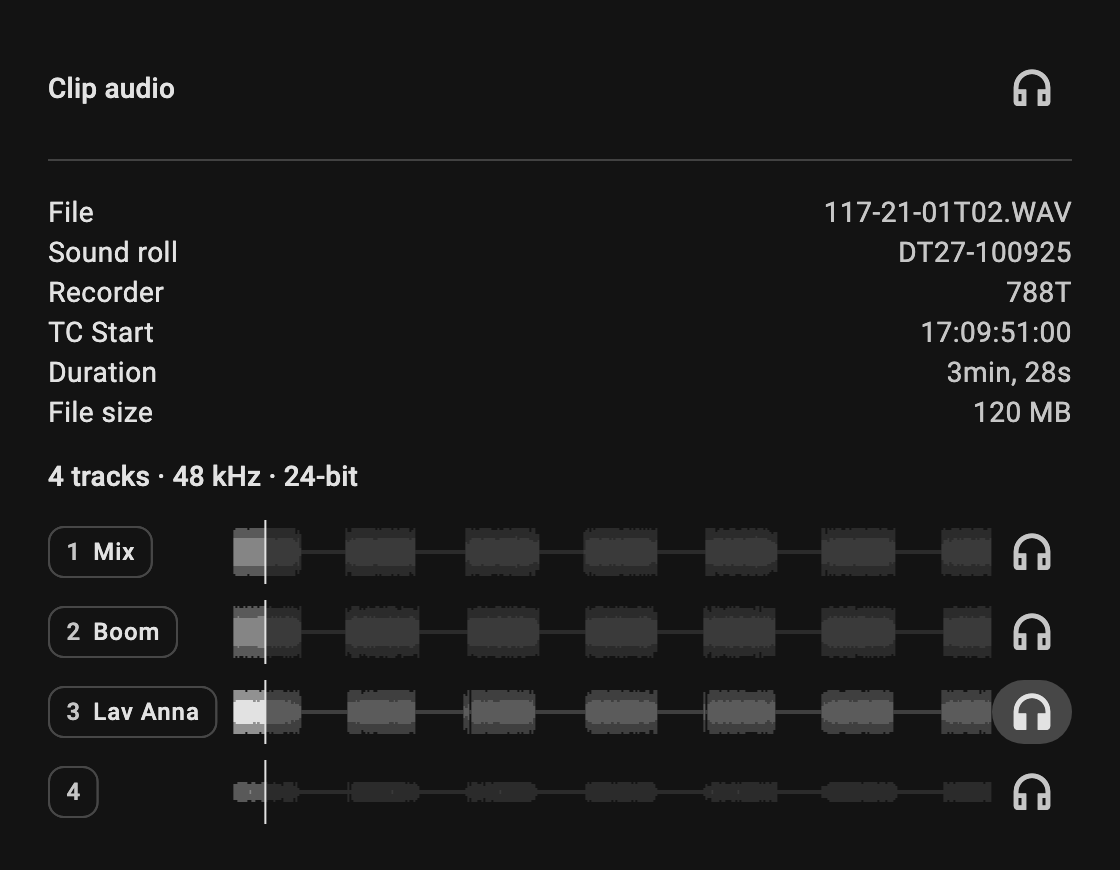
Once a take's sound is uploaded, each track shows its waveform, with a line following the player.
Clip audio is the sound in the clip's own file: usually the production sound, mixed down and synced in when the dailies were made, otherwise what the camera recorded.
- Press the headphones on a track to hear it with the picture instead of the clip audio. Press them on Clip audio to go back.
- You hear one source at a time: two microphones on the same voice, played together, sound hollow or echo.
- The source you hear is highlighted, and the waveforms of the others are dimmed.
- Your choice stays in fullscreen. The player's mute button silences everything.
The waveforms arrive before the sound, which uploads after the day's dailies, so a track gets its button once its sound is there too. Tracks play on paid projects, and only on clips you are allowed to see.
Where sound comes from
- Silverstack Link: every sound file in the library, with no setup. See Silverstack Link. When the DIT corrects a take there, the correction wins over what the recorder wrote.
- The
_audiofolder: copy the recorder's WAV files into the project's_audiofolder, or point a Silverstack backup there. o/DAILIES/MANAGER uploads every track, which waveforms and listening need. On a project not linked to Silverstack, these files also create the takes, from the scene, take, roll, timecode and track names the recorder wrote into them.
A take is one recording, however the recorder wrote it: a poly WAV (all tracks in one file), split mono (one file per track) or a mix plus isos (for example on a Cantar).
Left out, as for clips: folders starting with _exclude_ or _ignore_, Transcoded Clips, and files tagged ignore in Silverstack. Takes the recorder discarded (in a FALSETAKES or TRASH folder) are left out too, since the recorder gives the next take the same name.
Which sound belongs to which clip
A second unit can record at the same time, somewhere else, with the same timecode, so a timecode match could hand a clip the wrong sound. o/DAILIES therefore records only the sync someone actually made:
- Silverstack: the DIT's syncs.
- ALE: an ALE naming the synced sound file. See Sound in ALE files.
- API: an integration setting the link. See Sound.
A link names the sound file and, where the tool provides it, the offset: the point in the sound file that plays with the clip's first frame. The offset is kept as synced, so a sync made by waveform or corrected by hand is never recalculated from timecode. A link may name a file the project does not hold.
One metadata source per project
A project takes its metadata either from the Silverstack Link or from ALE files, not both. On a project linked to Silverstack, Silverstack's syncs are the ones that count.
Is uploaded sound synced by timecode?
Not yet; syncing uploaded sound automatically is planned for a later version. Today, WAV files in the _audio folder upload their tracks and, on a project without Silverstack, create their takes, but they do not attach themselves to any clip. A take appears in a clip's Sound panel, and can be listened to, only once a sync made in Silverstack, an ALE or the API names its file. Until then the clip plays its clip audio.